I wanted to see how well GravityWrite AI could handle a complete blog post, from preparing the outline to generating the final draft. For this, I chose a 2,000-word SEO article and explored the tool's writing settings, outline editor, and content generation features. The main thing I wanted to find out was whether GravityWrite could produce useful, well-structured content or whether the result would still require extensive manual editing.
My First Look at GravityWrite
GravityWrite is an AI content creation platform designed for blog writing, marketing copy, SEO content, and other writing tasks. It provides dedicated tools for different purposes, including an AI Blog Writer, text rewriting, image generation, and social media content creation.
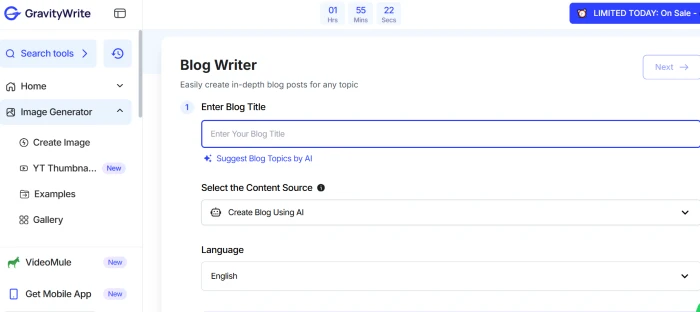
I focused on the AI Blog Writer because I wanted to create a complete article rather than generate short paragraphs. The tool follows a step-by-step process where users enter a topic, configure the writing settings, review an outline, and generate the full content.
What interested me most was the amount of control available before generating the article. GravityWrite allows users to choose the content depth, number of headings, keywords, and image settings. It also includes an option to review and modify the outline before proceeding.
These controls make the writing process more structured than entering a single prompt and accepting whatever the AI produces. However, I still needed to examine the generated content to understand whether those settings translated into a useful article.
Creating My First Blog
For the example article, I selected the topic "How AI Writing Tools Affect SEO Content Quality." It is a useful subject for evaluating an AI writer because the article needs to explain technical concepts, include relevant examples, and distinguish between content generation and actual search performance.
The goal was to create an informative article of approximately 2,000 words, written in simple English for bloggers and SEO professionals.
I prepared the following configuration for the writing task:
| Setting | Selected input |
| Blog title | How AI Writing Tools Affect SEO Content Quality |
| Primary keyword | AI writing tools |
| Secondary keywords | SEO content quality, AI blog writing |
| Target length | Around 2,000 words |
| Content depth | In Depth |
| Headings | 10–12 |
| Language | English |
| Images | One relevant illustration |
GravityWrite provides different options for controlling the article's depth and structure. According to its documentation, the In Depth option is intended for longer articles exceeding 1,500 words.
Another useful setting is manual keyword selection. Instead of depending entirely on the tool to suggest keywords, users can enter the terms they want the article to cover.
The platform also provides image-generation settings, including image models, quality options, and aspect ratios. These settings are useful when preparing complete blog posts, although generating images consumes additional credits.
Reviewing the Article Outline
GravityWrite allows users to generate an outline before creating the complete article. This is an important part of its writing process because the outline determines which subjects the final draft will cover.
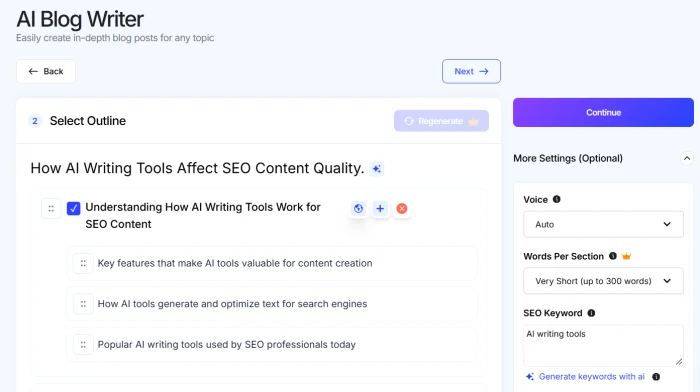
After entering the topic and selecting the relevant settings, the next step is generating the outline. The tool provides an editable heading structure, allowing users to review the sections before continuing.
Users can change heading titles, add missing sections, remove unnecessary topics, and rearrange the order. This makes it possible to correct structural problems before generating hundreds or thousands of words.
For my example article, the outline needed to cover keyword research, search intent, content accuracy, article structure, originality, and editorial review.
I would avoid keeping several headings that explain essentially the same thing. For example, separate sections titled "Benefits of AI Writing Tools" and "Why AI Writing Is Useful" could easily repeat information.
A more specific heading, such as "How AI Supports Keyword Research," gives the writer a clearer subject to explain. This is one of GravityWrite's more practical capabilities. It allows writers to decide what information belongs in an article before asking the AI to produce the full text.
Generating the Blog Post
Once the outline has been reviewed, GravityWrite lets users continue to the article generation stage. The platform creates content based on the selected topic, outline, keywords, and other writing settings.
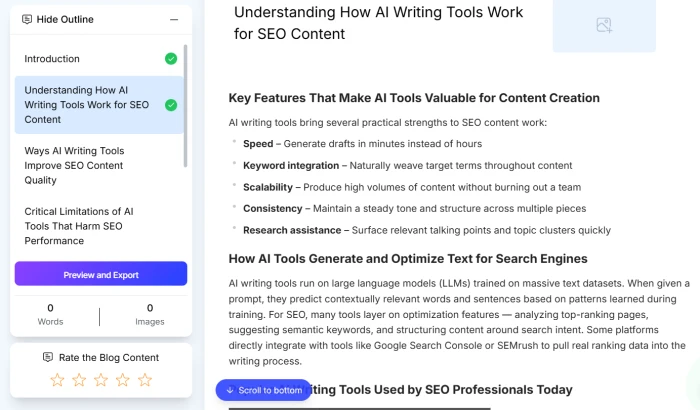
The generated article appears inside an editing interface. GravityWrite's documentation shows an outline panel alongside the content, making it easier to move between sections and locate parts that need revisions.
For the 2,000-word SEO article, the output would need to do more than explain the general advantages of AI writing. Each section should provide information relevant to its heading.
For example, a section about keyword research should explain how AI tools help organize keyword ideas, identify related subjects, and develop article structures. It should also clarify that keyword suggestions need validation using appropriate search data.
Similarly, a section about content quality should explain specific problems such as unsupported claims, repeated information, missing examples, and paragraphs that fail to answer the reader's question.
What I Would Check
There are five areas I would examine when reviewing the generated article:
● Introduction quality: The opening should introduce the actual subject immediately rather than spend several paragraphs explaining the popularity of artificial intelligence.
● Content depth: Each section should contain useful explanations, relevant examples, and information that goes beyond commonly repeated statements.
● Keyword usage: Primary and secondary keywords should appear naturally without making the writing repetitive or difficult to read.
● Factual accuracy: Statistics, studies, and technical claims should have reliable sources that can be independently verified.
● Paragraph structure: Each paragraph should explain a complete point, with enough detail to help readers understand the subject.
These checks provide a more useful measure of content quality than the generated word count alone. An article may contain 2,000 words and still need substantial editing if several sections repeat the same information. The real objective is to produce a draft that contains enough relevant material to reduce the writer's workload.
Editing the Generated Content
GravityWrite includes an editing feature that allows users to revise individual sections rather than regenerate the entire article. Users can also edit the text directly inside the content editor.
This is particularly useful for long-form articles because one weak section does not necessarily mean the entire draft needs replacing.
For example, consider this type of AI-generated explanation:
AI writing tools help improve SEO content by making the writing process faster and more efficient.
The statement is understandable, but it provides little practical information. It doesn't identify which writing activities become easier or explain how those activities affect content quality.
A stronger explanation would be:
AI writing tools can help organize keyword ideas, prepare article outlines, generate initial drafts, and identify repetitive language. However, writers still need to verify facts, check search intent, and add original examples before publishing.
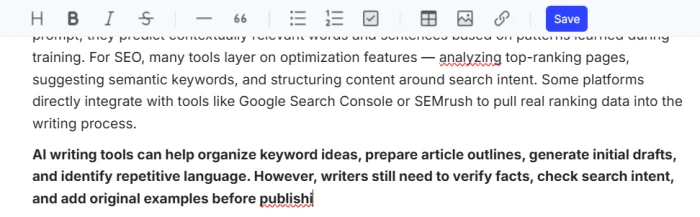
The second version explains specific capabilities and identifies the work that remains.
GravityWrite's editing controls make it possible to revise such passages without rebuilding the whole article. However, regenerating content is not the same as verifying its accuracy.
Changes That Matter Most
For a complete article, I would prioritize the following revisions:
● Remove paragraphs that repeat information already covered in earlier sections.
● Replace broad statements with practical explanations and examples.
● Check statistics, product information, and research claims against reliable sources.
● Improve headings that do not accurately describe the content below them.
● Review the introduction and closing to ensure they reflect what the article actually explains.
The important distinction is that GravityWrite can assist with rewriting, while the writer remains responsible for deciding whether the information is accurate, relevant, and complete.
Other GravityWrite Features
Although the AI Blog Writer is the main focus, GravityWrite includes several additional content tools.
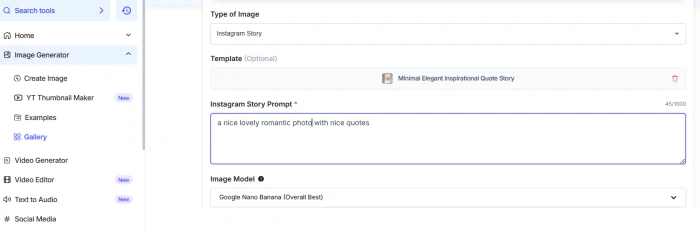
AI Image Generator: This feature creates visuals from text descriptions. It can be useful when a blog post needs an original illustration, although images should be checked for accuracy and relevance before publishing.
Text Humanizer: GravityWrite offers a rewriting tool intended to make AI-generated content sound more natural. It can help revise awkward wording, but it cannot automatically add firsthand experience or original research.
SEO Content Tools: These support keyword-focused writing and article preparation. They can help establish a relevant content structure, but they do not guarantee that a page will rank in search results.
Social Media Content Tools: GravityWrite can generate captions and other promotional content, making it possible to prepare supporting posts after completing an article.
WordPress Publishing: The platform advertises WordPress publishing capabilities, which may reduce the work involved in transferring content to a website. Formatting, images, and links should still be reviewed before publication.
Other features include video generation, website creation, and educational content tools. Their availability and usage limits depend on the selected plan.
GravityWrite Pricing
GravityWrite uses a credit-based pricing system. Credits are consumed when generating articles, images, and other content, with usage varying according to the selected features and models.
The following prices were publicly listed in October 2026:
| Plan | Price | Monthly credits |
| Free | $0 | 50 |
| Plus | $12/month, billed annually | 500 |
| Pro | $49/month, billed annually | 2,500 |
The Free plan is suitable for exploring the platform and trying its available writing features. Plus provides a larger allowance for regular content creation, while Pro is designed for heavier usage and offers additional capabilities.
For someone writing multiple articles every week, the number of credits consumed per finished article is an important consideration.
A draft requiring several rounds of regeneration and additional images may consume considerably more credits than a straightforward article. It is therefore useful to track credits across the entire writing process rather than looking only at the initial generation. Pricing and plan benefits should be checked on GravityWrite's official website before purchasing.
What Worked and What Didn't
GravityWrite provides a structured process for creating articles. Its main strengths are the outline controls, configurable writing settings, and ability to edit individual sections.
These features are relevant to anyone producing long-form content because they provide more control over the finished draft.
What Works Well
The ability to prepare and customize an outline is useful for articles requiring specific coverage. Writers can decide which sections to include and organize them before generating content.
Section-level editing is another practical advantage. Instead of replacing an entire article when one paragraph needs improvement, users can concentrate on the part that requires attention.
The platform also provides writing and image tools inside the same workspace, which may simplify content preparation for blogs and marketing websites.
What Could Be Better
The main limitation is that generating structured content does not automatically produce a fully researched article.
Writers still need to verify factual claims, improve weak explanations, remove repetitive material, and make sure the content satisfies the reader's actual question.
Long-form content can also become expensive in credits when it requires repeated generation or several high-quality images.
Another consideration is that AI-generated content may sound polished without providing enough detail. A readable paragraph is not necessarily an informative paragraph, especially when the subject requires technical explanations or evidence.
These are important quality checks for GravityWrite, rather than confirmed failures from the example article used here.
Final Verdict
GravityWrite AI provides a practical set of tools for planning, generating, and editing blog content. Its customizable outlines, long-form writing settings, and section regeneration features make it particularly relevant to bloggers and content writers who work with structured articles.
The platform looks most useful for preparing an initial draft and handling repetitive writing tasks. Research accuracy, original examples, and final editorial quality still require human involvement.
For writers producing regular blog content, GravityWrite is worth evaluating as a drafting assistant. Whether it saves enough time to justify a paid subscription depends on the quality of the generated articles, the amount of editing required, and the credits consumed during the complete workflow.